這篇文章將講解怎麼在 EinkBro 中利用攔截 http request,將 Youtube 影片在呈現字幕時,能夠順便顯示第二種外語字幕。
這樣子的功能通常都是在 PC 瀏覽器上利用外掛的 extension 完成的。在手機或是平板上幾乎很少有瀏覽器可以支援這樣子的效果。之前我也一直很想要在平板上有類似這樣子的功能,原先是想要修改很好用的 Youtube Alternative App NewPipe,無奈它採用了 ExoPlayer 當播放器,而 ExoPlayer 對我來說又過於複雜,最終一直沒有試出來。
但是,回到 EinkBro App 上的話,要做類似的修改就容易多了。以下就來說說我是怎麼實作的。
找出字幕的 url request
利用 Google Chrome Debugger Tool 觀察 Youtube 顯示和不顯示字幕時,會多出一個 http request,如下圖。
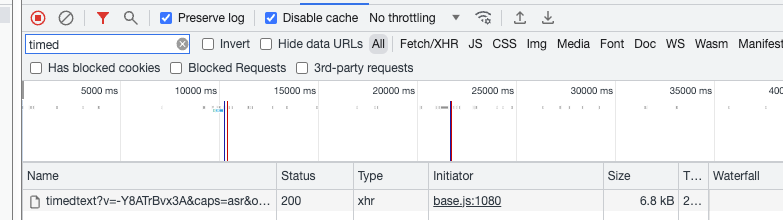
它的全部 url 會類似下面這個例子
所以,目前的作法是只要看到有 timedtext 的 url,我就認定它應該是 Youtube要顯示字幕,需要開始來做點處理。
同時下載兩個語言的字幕檔
在 WebView 中想攔截 http resource request 的話,可以實作在 WebViewClient 中的 shouldInterceptRequest() 函式。
下面的程式碼寫得落落長,但重點只在於 newUrl = “$url&tlang=zh-Hant” 和下載 oldCaption,newCaption。要從 timedtext 的 url 延伸成其他翻譯好的字幕語言,只需要加上 tlang 的參數就行了,是不是很方便。
下載後,再來就是把兩個字幕檔合併在一起,只要合併得好,其實Youtube 並不知道它究竟顯示的是它原先需要的原字幕檔,還是經過我處理的版本。合併的方式在下一小節說明。
private fun handleWebRequest(webView: WebView, uri: Uri): WebResourceResponse? {
    ...
    if (url.contains("timedtext")) {
        val newUrl = "$url&tlang=zh-Hant"
        val oldCaption = runBlocking { BrowserUnit.getResourceFromUrl(url) }
        val newCaption = runBlocking { BrowserUnit.getResourceFromUrl(newUrl) }
        val oldCaptionJson = json.decodeFromString(TimedText.serializer(), String(oldCaption))
        val newCaptionJson = json.decodeFromString(TimedText.serializer(), String(newCaption))

        // 合併兩個字幕檔

        return WebResourceResponse(
            "application/json",
            "UTF-8",
            ByteArrayInputStream(
                json.encodeToString(TimedText.serializer(), oldCaptionJson).toByteArray()
            )
        )
    }
...
}
合併兩個字幕檔
仔細看 timedtext API 呼叫後回傳的資料結構(如下),它是一個 json 檔案,說明格式為 wireMagic 的 pb3。而重點就在於其中的 events。events 中定義了每段字幕的起始/結束時間,和字幕內容。不論哪個語言都是以這種型式表現。
{
  "wireMagic": "pb3",
  "pens": [ {

  } ],
  "wsWinStyles": [ {

  } ],
  "wpWinPositions": [ {

  } ],
  "events": [ {
    "tStartMs": 366,
    "dDurationMs": 1834,
    "segs": [ {
      "utf8": "\t它画质只有2.7K"
    } ]
  }, {
    "tStartMs": 2200,
    "dDurationMs": 7633,
    "segs": [ {
      "utf8": "但是…我喜欢…今儿是新品影石insta360 Go3的主场"
    } ]
  }, {
  ...
  }]
}
了解資料結構後,先建立一堆 data class,把 json 轉成可以操作的對象。
@Serializable
data class TimedText(
    @SerialName("wireMagic") val wireMagic: String,
    @SerialName("pens") val pens: List<Pen>,
    @SerialName("wsWinStyles") val wsWinStyles: List<WsWinStyle>,
    @SerialName("wpWinPositions") val wpWinPositions: List<WpWinPosition>,
    @SerialName("events") val events: MutableList<Event>
)

@Serializable
class Pen

@Serializable
data class WsWinStyle(
    @SerialName("mhModeHint") var mhModeHint: Int? = null,
    @SerialName("juJustifCode") val juJustifCode: Int? = null,
    @SerialName("sdScrollDir") var sdScrollDir: Int? = null
)

@Serializable
data class WpWinPosition(
    @SerialName("apPoint") val apPoint: Int? = null,
    @SerialName("ahHorPos") val ahHorPos: Int? = null,
    @SerialName("avVerPos") val avVerPos: Int? = null,
    @SerialName("rcRows") val rcRows: Int? = null,
    @SerialName("ccCols") val ccCols: Int? = null
)

@Serializable
data class Event(
    @SerialName("tStartMs") val tStartMs: Long = 0,
    @SerialName("dDurationMs") val dDurationMs: Long = 0,
    @SerialName("id") val id: Int = 0,
    @SerialName("wpWinPosId") val wpWinPosId: Int? = null,
    @SerialName("wsWinStyleId") val wsWinStyleId: Int? = null,
    @SerialName("wWinId") val wWinId: Int? = 1,
    @SerialName("segs") val segs: MutableList<Segment>? = mutableListOf()
)

@Serializable
data class Segment(
    @SerialName("utf8") var utf8: String,
    @SerialName("acAsrConf") val acAsrConf: Int = 0
)
下面是合併兩個檔案的方式:對於 startMs 相同的片段,就把它們的字幕組合到同一個區段中。
oldCaptionJson.wsWinStyles.forEach {
        if (it.mhModeHint != null) {
             it.mhModeHint = 0
         }
          if (it.sdScrollDir != null) {
              it.sdScrollDir = 0
           }
       }
oldCaptionJson.events.forEach { event ->
       if (event.segs != null && event.segs.size > 0) {
          val first = event.segs.first()
          first.utf8 = event.segs.map { it.utf8 }.reduce { acc, s -> acc + s }
          first.utf8 += "\n" +
                newCaptionJson.events.firstOrNull {
                   it.tStartMs == event.tStartMs }?.segs?.map { it.utf8 }
                   ?.reduce { acc, str -> acc + str }
                ?: ""
          event.segs.clear()
          event.segs.add(first)
       }
    }
這麼一來,就完成啦!
示範影片
相關程式碼
commit: https://github.com/plateaukao/einkbro/commit/ab6f79c285e6d546dcfa1e8e5c6efb09e9abcd60