擴充 AskGPT KOReader plugin: 新增一鍵加入筆記
這篇文章將說明在 AskGPT plugin 中 怎麼將 gpt 查詢結果一鍵存入筆記,並且說明開發 KOReader plugin 時如何避免踩雷。
在前一篇文章中已經實作了點擊按鈕後,喚起編輯筆記的對話框。雖然也是能達到效果,但畢竟多了一步。大多數儲存 gpt 結果的時候,是不需要編輯內容的,所以我又繼續研究怎麼將中間這一步省略掉。
研究既有實作
在 readerhighlight.lua 中,既有的加筆記函式實作內容如下:
function ReaderHighlight:addNote(text)
    local index = self:saveHighlight(true)
    if text then -- called from Translator to save translation to note
        self:clear()
    end
    self:editHighlight(index, true, text)
    UIManager:close(self.edit_highlight_dialog)
    self.edit_highlight_dialog = nil
end

function ReaderHighlight:editHighlight(index, is_new_note, text)
    self.ui.bookmark:setBookmarkNote(index, is_new_note, text)
end
如程式碼所示:
- 它會先把標記存下來 (
self.saveHighlight); - 並且開啟編輯的對話框 (
self.editHighlight)。
再往下看的話,可以看到 self.editHighlight 其實是去呼叫另一個 bookmark 模組的函式。
那麼,我們再來看看下面 bookmark.setBookmarkNote() 是怎麼實作的。以下內容是去掉不相干邏輯後的函式實作。InputDialog 是編輯筆記時的對話框主體。由於我想要的行為是完全不出現這個 UI 介面,直接將結果儲存,所以需要參考的實作是它的 Save Button 點擊邏輯。
從 Save 的實作中可以看到,它主要做了兩件事:
- 把
value塞入annotation - 利用
self.ui.handleEvent將這個annotation的變化傳給需要知道的人。
而 annotation 則是在函式的第一行取得的。
function ReaderBookmark:setBookmarkNote(item_or_index, is_new_note, new_note)
    local annotation = self.ui.annotation.annotations[index]
    local type_before = item and item.type or self.getBookmarkType(annotation)
    input_text = new_note
    self.input = InputDialog:new{
        title = _("Edit note"),
        description = "   " .. self:_getDialogHeader(annotation),
        input = input_text,
        allow_newline = true,
        add_scroll_buttons = true,
        use_available_height = true,
        buttons = {
            {
                 ...
                {
                    text = _("Save"),
                    is_enter_default = true,
                    callback = function()
                        local value = self.input:getInputText()
                        if value == "" then -- blank input deletes note
                            value = nil
                        end
                        annotation.note = value
                        local type_after = self.getBookmarkType(annotation)
                        if type_before ~= type_after then
                            if type_before == "highlight" then
                                self.ui:handleEvent(Event:new("AnnotationsModified",
                                    { annotation, nb_highlights_added = -1, nb_notes_added = 1 }))
                            else
                                self.ui:handleEvent(Event:new("AnnotationsModified",
                                    { annotation, nb_highlights_added = 1, nb_notes_added = -1 }))
                            end
                        end
                        if annotation.drawer then
                            self.ui.highlight:writePdfAnnotation("content", annotation, value)
                        end
                        UIManager:close(self.input)
                        if from_highlight then
                            if self.view.highlight.note_mark then
                                UIManager:setDirty(self.dialog, "ui") -- refresh note marker
                            end
                        else
                            item.note = value
                            item.type = type_after
                            item.text = self:getBookmarkItemText(item)
                            self.refresh()
                        end
                    end,
                },
            }
        },
    }
    UIManager:show(self.input)
    self.input:onShowKeyboard()
end
改寫現有機制
了解了既有的實作後,試著將上面的作法實作到 AskGPT plugin 中。把原先的 addNote() 函式換成上述的內容,省略了一大堆關於對話框的操作。
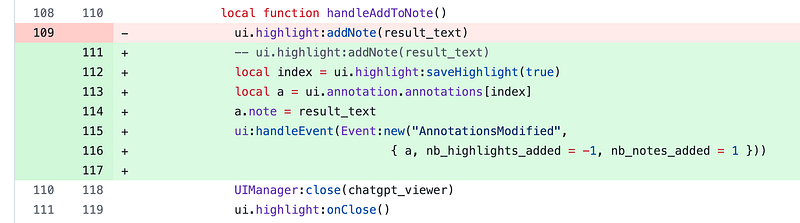
看似完全照抄的內容,卻在執行時一直 crash。系統總是找不到 ui.annotatoin 這個元件;但明明看程式碼,其他的元件也都是這麼呼叫的啊。為什麼就我的 plugin 無法取得。
系統總會跳出以下的錯誤訊息:
Failed to run script: …ulated/0/koreader/plugins//askgpt.koplugin/askdialog.lua:113: attempt to index field ‘annotation’ (a nil value)
查找為什麼會出錯
針對這個出錯點,花了兩三天在查問題出在哪,一直沒有什麼頭緒。過程中還讓我多學了一點怎麼在 android 上 debug KOReader 的開發。如果只是安裝 KOReader app,沒做什麼設定的話,當 App crash 時,會在畫面上出現一顆炸彈圖案,偶爾會附上出錯的 call stack。但大部分情況下,就只有顯示一顆炸彈,讓人一頭霧水,不知從何查起。
後來,再認真研讀文件後,找到在 KOReader 的文件瀏覽模式下,可以從工具列的 more tools 找到打開 debugging information 的選項。一旦這個選項打開了,就不用苦苦等炸彈畫面的 call stack;在常用的 android logcat 中就可以看到許多關於 KOReader 的 debugging information。而且,也包含了 crash 時最重要的 call stack。
雖然會了這個技巧,但依然無法讓我找到為什麼 ui.annotation 總是 nil 的原因。
求援
無奈之下,只好在 KOReader github 上開了一條 issue,問問眾開發大神。
於是,我洋洋灑灑解釋了一大篇:
FR: A function to save notes directly without showing Note Edit Dialog · Issue #11948 ·…
裡面包含了我想做的事,參考的程式碼,以及 crash 時的 error logs。
然後…在十幾二十分鐘內就得到了答案,也解了這個我追了好幾天的難題!
原因原來出在我在參考的程式碼是 github 上最新的程式碼,而我在測試設備上裝的版本是 stable version。兩者間還是有一定的程式碼差別。就那麼剛好,我需要使用的 ui.annotation 是在最新程式碼中才有的元件; stable release version 中其實還無法參考到這元件。
解決這個 crash 的方式是:把我測試的版本升級到 development channel 的 nightly build 版本就可以了!
心得
搞清楚自己在開發的 App 版本和參考實作的程式碼版本是一致的,這點很重要,很重要,很重要。
下次不要再犯這種錯誤了。