Developer Guide
EinkBro is built with Kotlin and modern Android development practices. This guide covers the architecture, build process, and key development areas for contributors.
Architecture Overview
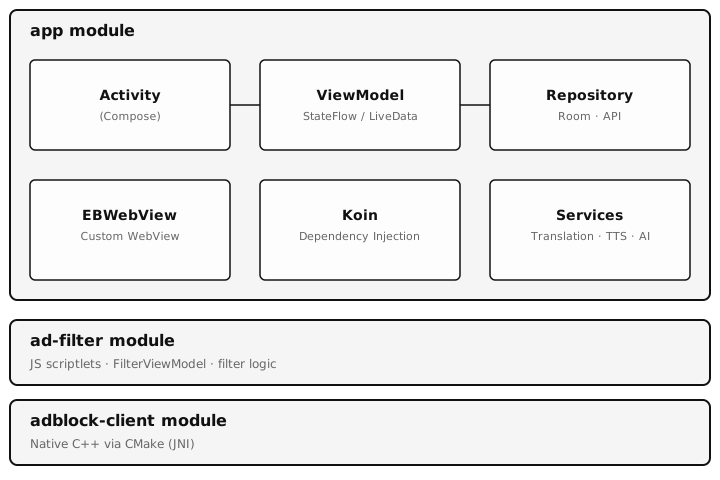
Core Patterns
- MVVM — ViewModels with LiveData/StateFlow for UI state management
- Repository Pattern — Data layer abstraction (e.g.,
OpenAiRepository.kt) - Dependency Injection — Koin container configured in
EinkBroApplication.kt - Room Database — Local persistence with KSP annotation processing
- Jetpack Compose — UI components (dialogs, settings, toolbar, menus)
Module Structure
| Module | Purpose | Key Technologies |
|---|---|---|
| app | Main browser application | Kotlin, Compose, Room, Koin, WebView |
| ad-filter | Ad-blocking logic and JS scriptlets | JavaScript, FilterViewModel |
| adblock-client | Native ad-blocking implementation | C++, CMake, JNI |
Key Components
| Component | Description |
|---|---|
EinkBroApplication.kt | Application class; initializes Koin DI container |
BrowserActivity.kt | Main activity (singleInstance launch mode); handles all browser UI |
EBWebView.kt | Custom WebView with E-Ink optimizations (scroll behavior, reader mode CSS injection, JS interfaces) |
GptActionsActivity.kt | UI for AI/ChatGPT interactions |
OpenAiRepository.kt | API communication layer for OpenAI, Gemini, and compatible servers |
ChatGptQuery.kt | Room database entity for persisting GPT query results |
ConfigManager.kt | SharedPreferences wrapper with Kotlin property delegates for all settings |
ToolbarAction.kt | Enum defining all 43 toolbar actions with icons, labels, and states |
MenuDialogFragment.kt | Compose-based action menu with collapsible sections |
Build Configuration
| Property | Value |
|---|---|
| Min SDK | 24 (Android 7.0) |
| Target SDK | 34 (Android 14) |
| Compile SDK | 36 |
| JVM Target | Java 17 |
| Kotlin | 2.1.20 with KSP |
| Build Tools | AGP 8.13.2, Gradle 8.14.5 |
| ABI Splits | arm64-v8a, armeabi-v7a, x86, x86_64 |
Build Commands
Development
# Build debug APK
./gradlew assembleDebug

# Build release APK
./gradlew assembleRelease

# Build releaseDebuggable variant
./gradlew assembleReleaseDebuggable

# Install debug on connected device
./gradlew installDebug

# Clean build
./gradlew clean
Testing
# Run unit tests
./gradlew test

# Run instrumented tests
./gradlew connectedAndroidTest

# Run lint checks
./gradlew lint

# Debug lint only
./gradlew lintDebug
Key Development Areas
WebView Customization
E-Ink specific WebView optimizations are implemented in EBWebView.kt:
- Custom scroll behavior tuned for E-Ink refresh patterns
- Reader mode CSS injection for clean content display
- JavaScript interfaces for native feature integration (touch tracking, page info, etc.)
- JS files are stored in
assets/and loaded at runtime
AI Integration
ChatGPT/AI functionality spans several components:
GptActionsActivity.kt— UI for AI chat interactionsOpenAiRepository.kt— API communication for OpenAI, Gemini, and self-hosted serversChatGptQuery.kt— Room entity for persisting query history- Custom GPT actions defined by users with system prompts
EPUB Processing
Complete EPUB reading and writing using EPubLib:
- Parse and render EPUB content within the browser
- Export web content to EPUB with images and multi-chapter support
- Editable table of contents with drag-and-drop reordering
Translation Services
Multi-provider translation with paragraph-level, full-page, and image translation. Providers include Google Translate, DeepL, and AI-based translation via OpenAI/Gemini.
Database & Schema
Room database schemas are stored in app/schemas/. When modifying entities, ensure migration paths are properly defined. Key entities include bookmarks, history records, GPT queries, and whitelists.
Internationalization
The project supports 25+ languages managed through Crowdin. Translation files follow standard Android format at res/values-*/strings.xml. Do not edit translation files directly — changes should go through Crowdin.
ProGuard
Release builds use ProGuard for code obfuscation and optimization:
app/proguard-rules.txt— Release buildsapp/proguard-rules.pro— ReleaseDebuggable builds
Contributing
- Fork the repository on GitHub
- Create a feature branch from
main - Make your changes and test on an E-Ink device if possible
- Submit a Pull Request with a clear description of changes
The project uses Fastlane for deployment automation and supports F-Droid distribution.