Architecture
- The four-layer pipeline
- Why these layers, in this order
- Things that look weird but are load-bearing
- Reference material
The four-layer pipeline
A stylus touch travels through four layers before pixels appear on the e-ink panel. None of these layers makes sense in isolation — they exist as a unit because each one is solving a separate problem the layer below it doesn’t know about.
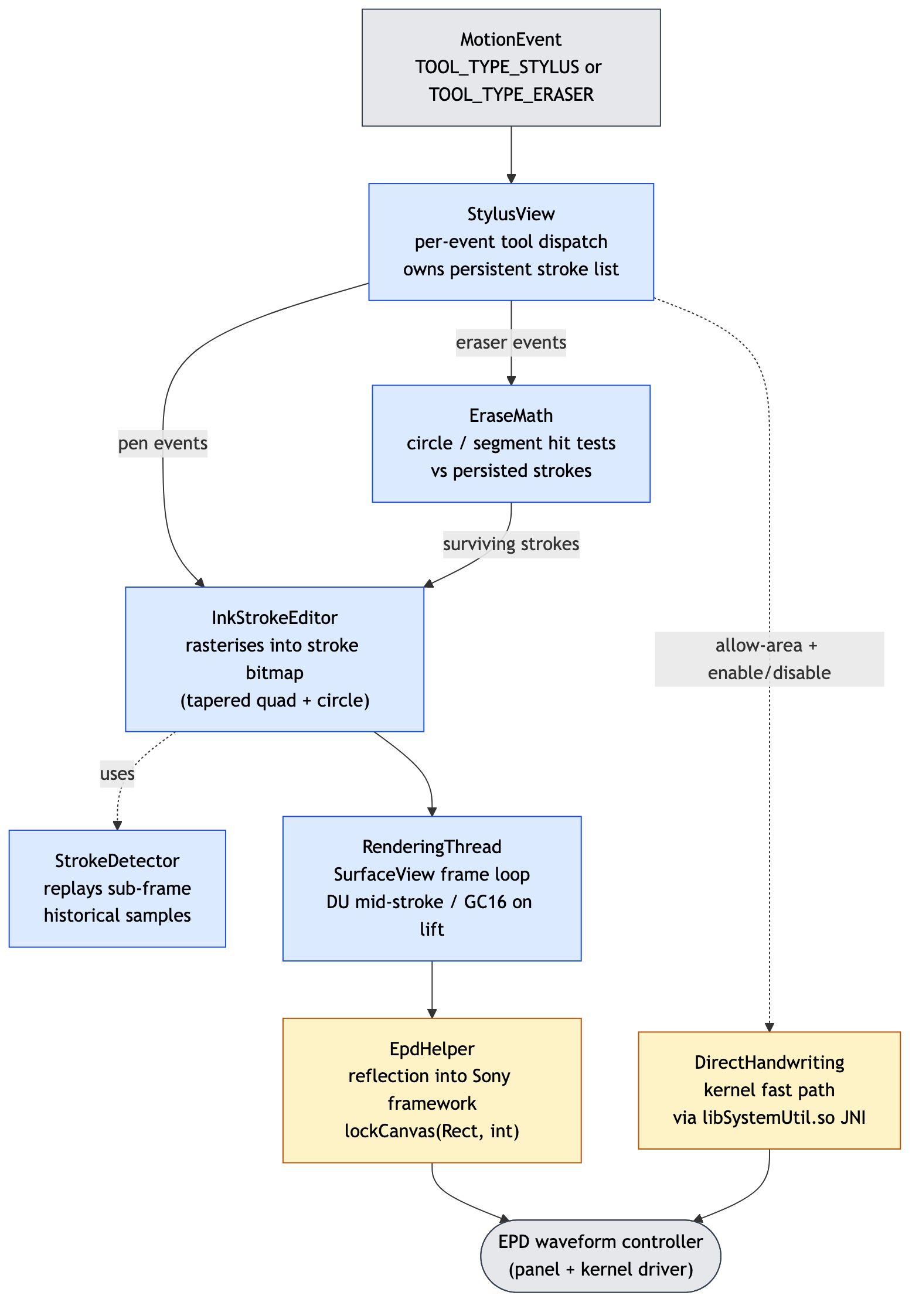
Blue nodes are this app’s Java code; yellow nodes reach into Sony’s framework (via reflection or JNI); grey nodes are external boundaries — the OS event source at the top, the panel + kernel driver at the bottom. The source of this diagram is in docs/diagrams/architecture.mmd; run docs/diagrams/regen.sh to rebuild the PNG.
Why these layers, in this order
StylusView is intentionally thin
It dispatches each MotionEvent to one of two private methods based on the tool that produced it. There is no UI mode toggle for switching between pen and eraser — flipping the stylus does it, the same way it works in Sony’s app and in Apple Pencil / Surface Pen / Wacom apps everywhere else.
The dispatch checks two conditions:
boolean erase = toolType == MotionEvent.TOOL_TYPE_ERASER
        || (event.getButtonState() & MotionEvent.BUTTON_TERTIARY) != 0;
Both are needed. Wacom EMR stylus firmware usually reports the flipped tip as TOOL_TYPE_ERASER, but some Sony firmware reports it as a button press with BUTTON_TERTIARY instead. The DigitalPaperApp source has both checks; we keep both.
Strokes are persisted, then rendered twice
Every pen-down → pen-up cycle produces a Stroke (a point list with a cached bounding box) which is appended to a list owned by StylusView. This sounds redundant — we already drew the stroke into the bitmap — but it pays for itself in two places:
- Erase. The eraser needs to know what to remove, not just paint white over the bitmap. With persisted strokes,
EraseMathdoes a per-stroke hit test, removes the hit ones from the list, thenInkStrokeEditor.renderAllre-rasterises what’s left onto a freshly cleared bitmap. - GC16 final refresh. When the stroke ends,
RenderingThreadre-paints the dirty region in GC16 partial mode. The persisted bitmap is what gets drawn into that final clean frame, overwriting any DU-mode ghosting and (importantly) any kernel-DHW pixels that the framebuffer driver painted directly without going through the Android compositor.
StrokeDetector replays historical events
Android batches MotionEvents to roughly 60Hz. On a Wacom EMR digitiser running at 200Hz+, that means each ACTION_MOVE event you receive often contains 2-4 sub-frame samples in its getHistorical*() arrays. If you ignore them you get visibly polygonal curves at speed.
StrokeDetector.onTouchEvent walks getHistorySize() first, then emits the final sample. This is ported directly from com.sony.apps.digitalpaperapp.utils.StrokeDetector.
RenderingThread decouples paint from input
It’s a dedicated thread that owns the SurfaceView frame loop and waits on notify() from the input-handling code. Three signals can wake it:
requestRender()— there are new dirty rects to paint. Pick DU mode.requestFinalize()— the stroke ended, paint the accumulated dirty region in GC16 partial mode for a clean result.clear()/exit()— destructive.
Keeping this on its own thread matters because GC16 partial takes ~450ms; if it ran on the input thread, the next stroke’s ACTION_DOWN would be queued behind it.
EpdHelper is the only place that knows about Sony
All the Sony-specific knowledge — the existence of lockCanvas(Rect, int), the meaning of the update-mode int constants — is concentrated in EpdHelper and EinkMode. The rest of the app just calls EpdHelper.lockCanvas(...) and passes an EinkMode.UPDATE_MODE_* constant.
The reflection in EpdHelper.resolve() catches NoSuchMethodException silently. If you install the APK on a stock Android device, the calls fall back to plain holder.lockCanvas() and you get standard slow Android compositing. This is how the app stays development-friendly — you don’t need a DPT-CP1 in front of you to iterate on input handling or stroke geometry.
Things that look weird but are load-bearing
Read these before “cleaning up” the code:
Region.Op.REPLACEinInkStrokeEditor.drawSegment— deprecated on stock Android, works on Sony’s device. Without it the eraser’s dirty rect grows unboundedly because each segment paint touches the entire previous canvas state.paint.setAntiAlias(false)everywhere — EPD DU mode is 1-bit. Anti-aliased greys produce dithered output that the next DU update can’t redraw cleanly, leaving smeared ghosts.- DHW is toggled off during eraser strokes — the kernel fast-path doesn’t know about “eraser”. If you don’t disable it, the eraser motion gets painted as ink by the framebuffer driver, and you erase a stroke while leaving a fresh black line where you erased.
- The package path
com/sony/infras/dp_libraries/systemutil/SystemUtilis exact — see Direct Handwriting. libSystemUtil.sois loaded by absolute path, not byloadLibrary— we don’t redistribute Sony’s binary; we pointSystem.loadat/system/lib/libSystemUtil.soon the device. This works only because the DPT-CP1 is API 22 (before Android 7’s linker namespace isolation). See Direct Handwriting.
Reference material
The decompiled DigitalPaperApp and the original EPDHelper.jar from /system/framework live in reference/ (gitignored, ~80MB). When something in this app’s design looks arbitrary, the answer is usually in reference/decompiled/DigitalPaperApp/sources/com/sony/apps/digitalpaperapp/.