
打造 E-ink 專用的瀏覽器: Part III
打造 E-ink 專用的瀏覽器 (III): 支援 VI 快速鍵 去不了的滑雪場 離 Part II 文章完成竟然快要一年了!我們在 Part III 裡,就來聊聊這一年多了那些新功能吧。如果你是第一次看到這系列文章,歡迎從下面兩篇先讀起。 ...
打造 E-ink 專用的瀏覽器 (III): 支援 VI 快速鍵 去不了的滑雪場 離 Part II 文章完成竟然快要一年了!我們在 Part III 裡,就來聊聊這一年多了那些新功能吧。如果你是第一次看到這系列文章,歡迎從下面兩篇先讀起。 ...
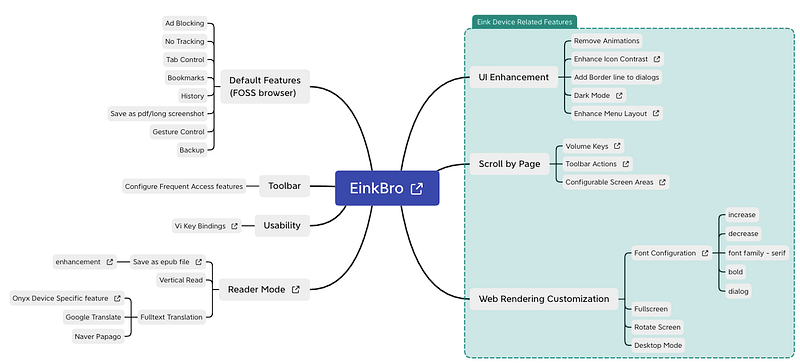
Web Browser for Android E Ink Devices (EinkBro) As the CPU power is getting stronger, and screen refresh speed keeps improving for E-Ink devices, more and more people start to use E-Ink devices to browse the internet. It’s doable; however the experience is still not good enough. Existing browsers are not designed for E-Ink devices. So many UI elements are designed for normal Android devices: fancy animations, dimming background when dialogs pop up, etc. ...

打造 E-ink 專用的瀏覽器 (II): 增加按鈕、桌面模式、改善 UI 開始來改造 Browser 吧 增加 PageUp / PageDown 按鈕 大部分的電子書閱讀器雖然有 A2 模式可以啟動,加速畫面繪製的速度,但是如果能讓瀏覽器跟看書一樣,是以頁為單位往上或往下前進的話,還是比較方便,而且會造成的殘影也會少一些。 ...

打造 E-ink 專用的瀏覽器 (I): Onyx Boox 上的怪現象 這是一個追查為什麼 FOSS browser 在 Onyx Boox 電子書閱讀器上,會莫名奇妙地跳轉網頁的無聊故事 需求 目前的開放式電子書閱讀器都已經做得很方便,除了可以安裝一般的電子書 App 像是 Kindle, Kobo, Google Play Books, Hyread 之外,還有內建瀏覽器供使用者偶爾上上網,查查資料。如果切到 A2 Mode (註1),其實使用起來的速度已經可以讓人接受,不會整個畫面閃不停。 ...